
Lucky Melody - Earn Money
Jude NcusuMusic & Audio
4.317.00 Reviews
- Version
- 1.0.1
- Installs
- 100.00K
- Age Rating
- Everyone
Screenshots
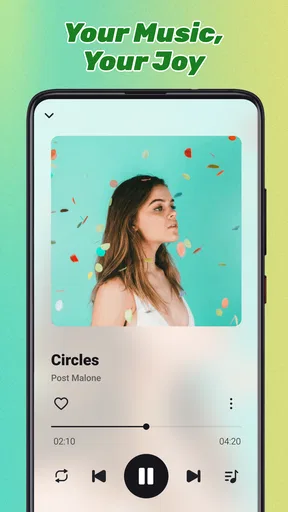
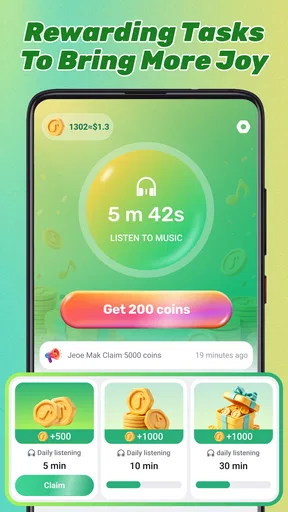
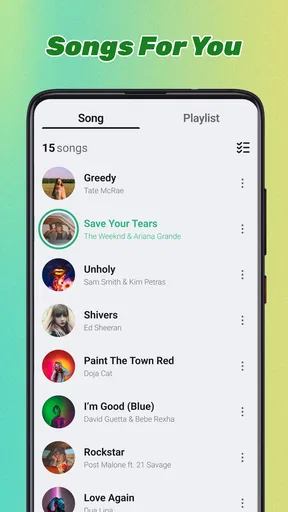

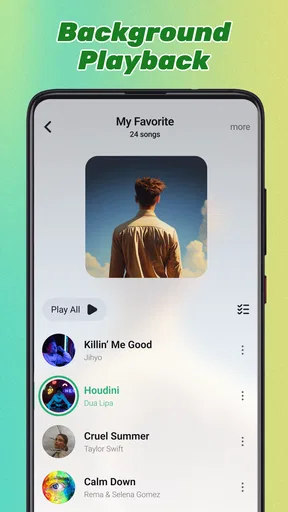
Our Review of Lucky Melody - Earn Money
 Analysis by Appyee
I approached Lucky Melody - Earn Money as a music and audio app rather than as a typical streaming giant. Its promise is simple: make listening fit around the rest of your day. In practice, that makes connectivity an important part of the experience. Whether you are moving between Wi-Fi and mobile data, waiting for a page to respond, or trying to keep music going while doing something else, the quality of the connection affects how comfortable the app feels.
What I like most is the straightforward idea behind it. The app is free, aimed at an Everyone audience, and developed by Jude Ncusu. It does not present itself as a complicated audio workstation or a specialist tool for musicians. Instead, it belongs to the everyday music category: something you open when you want sound nearby without turning the process into a project.
That simplicity is also where I would set expectations. A short store summary cannot tell you how an app behaves in every network situation, and I would not treat Lucky Melody as a replacement for every established music service. Its appeal depends on whether its lightweight approach matches your listening habits. If you want a focused, easy-to-try option, it is worth considering. If you need a deep library, carefully managed offline listening, or advanced audio controls, you should compare it closely with the tools you already use.
How Lucky Melody feels when the connection changes
I find that changing networks is less distracting when I treat a listening session as something to resume rather than something to keep tapping through. A brief pause while moving from Wi-Fi to mobile data does not necessarily mean the app has failed, so I give it a moment and check the connection before restarting playback. That small habit helps me tell ordinary coverage hiccups from a pattern that makes a particular route a poor fit.
Starting a listening session on a busy network
The first thing I pay attention to with any music app is the moment between tapping a track and actually hearing it. That small pause says a lot about the design. On a strong connection, the experience should feel natural: open the app, choose something, and let the audio take over. On a crowded public network, the same action becomes a test of patience because music is more sensitive to interruptions than a static page.
With Lucky Melody, I would use it most confidently when I know the connection is reasonably stable. That could be at home, in a familiar office, or while travelling through areas with dependable mobile coverage. I would be more cautious about making it the only source of entertainment on a long journey where the signal changes repeatedly. The app’s central value is tied to access to listening, so network quality is not a minor detail; it shapes the whole session.
This is one reason I would not judge it only by its first screen. A music app can look clean and still feel frustrating if every transition depends on a weak signal. My practical advice is to test it in the places where you actually listen: your kitchen, commute, workplace, or gym. A service that performs well in one location may feel less comfortable in another, especially when you move between connection types.
Moving from Wi-Fi to mobile data
Switching networks is a common mobile moment that many reviews overlook. I might begin listening at home over Wi-Fi, leave for an appointment, and expect the same session to continue while the phone changes to cellular service. That handoff is where a music app proves whether it is designed for real routines rather than ideal conditions.
If playback pauses during a network change, I prefer a clear recovery path instead of repeatedly tapping the same control. A useful habit is to wait briefly after the signal changes, then check whether the app has resumed before starting another action. Rapidly opening screens, changing tracks, and retrying playback can make a temporary connection issue feel like an app failure.
Lucky Melody makes the most sense for listeners who are comfortable treating connectivity as part of the setup. I would start a session before leaving a reliable network, keep the phone where it can maintain a signal, and avoid assuming that every transition will be invisible. That is not a criticism unique to this app; it is the practical reality of network-led music listening. Still, it matters because the app’s simple promise becomes less convenient when the connection is unpredictable.
Listening in short mobile moments
The best fit I see is casual listening in small pieces of time. I could open it while preparing breakfast, use it during a short walk, or play music while tidying a room. These situations do not require elaborate playlists or studio-level controls. They reward an app that can get me from launch to listening without demanding much attention.
There is also a useful distinction between “mobile” and “portable.” A phone may be with me everywhere, but that does not mean every place offers the same network conditions. In a café, underground station, lift, rural road, or crowded event, the connection can become the limiting factor. I would therefore treat Lucky Melody as a convenient companion for connected moments, not automatically as a complete travel plan.
For a quick session, I would keep my workflow deliberately simple: open the app, choose the music I want, and avoid unnecessary navigation once playback begins. This reduces the number of moments where a weak connection can interrupt me. It also helps preserve battery attention; I am listening rather than constantly watching the screen for signs that something has stalled.
What happens when playback or loading fails
Every network-based audio experience needs a calm recovery routine. When music stops, my first step is to identify whether the problem is local or app-specific. I check whether other connected apps respond, look at the signal indicator, and give the current action a moment before retrying. If other services are also struggling, restarting the app immediately is unlikely to solve the real issue.
If the connection appears fine, I would close and reopen the listening session rather than repeatedly pressing play. This avoids turning one delayed request into several competing requests. I also prefer moving to a stronger connection before deciding that the app itself is unreliable. A short test on a known stable network can separate a temporary coverage problem from a recurring experience issue.
The important limitation is that I would not build a critical routine around uninterrupted access unless I had personally tested the exact places I use. For example, I would hesitate to rely on it as my only audio option during a flight, a remote trip, or a commute with long signal gaps. In those situations, an established alternative with a clearly supported offline workflow may be the safer choice.
Recovering without losing the purpose of the session
Recovery is not only about getting playback back. It is also about losing as little time and focus as possible. If I am using music to make a repetitive task more pleasant, a long troubleshooting sequence defeats the point. My preferred approach is to stop, improve the connection if possible, reopen the app once, and then decide whether to continue or switch to another source.
This is where Lucky Melody’s uncomplicated positioning can work in its favor. I am less likely to overconfigure a casual listening session. At the same time, the app is not the right choice for someone who wants a large set of controls for diagnosing every playback condition. A specialist music service or a player built around locally managed files may offer more predictable control when connectivity is the main risk.
Using mobile data thoughtfully
Because music can consume a meaningful amount of data over time, I would avoid treating a free app as cost-free in every sense. The app itself has no purchase price, but your mobile plan still matters. I would pay attention to how long I listen over cellular service, especially when using it outside familiar Wi-Fi networks. This is a practical trade-off rather than a reason to dismiss the app.
A simple data-conscious routine is to reserve longer sessions for a trusted Wi-Fi connection and use mobile data for shorter listening periods. I would also avoid leaving audio running unattended when I am not actually listening. That habit is easy to overlook when music is playing in the background, and it can turn a few minutes of convenience into unnecessary network use.
Another useful tip is to watch the phone’s own data-usage tools rather than guessing. The operating system can show whether an app is becoming a significant part of your monthly consumption. That gives me a more honest basis for deciding whether Lucky Melody fits my plan than a general assumption about all music apps. If the numbers are uncomfortable, I would limit cellular listening or choose a service whose storage and offline behavior better match my needs.
Battery, attention, and background listening
Connectivity also affects battery indirectly. A phone working harder to maintain a weak signal can feel less efficient than one connected to a stable network, and repeated loading attempts add more friction than a single uninterrupted session. I would therefore use the app in places with reliable coverage when battery life is important, such as during a long day away from a charger.
There is an attention cost as well. Music should usually stay in the background, but connection problems pull me back to the screen. If I find myself checking the app repeatedly, I would treat that as a sign that the current location is not a good match. The best mobile experience is not simply one where audio starts; it is one where I can forget about the app for a while.
Who will get the most from it
I see Lucky Melody as a reasonable option for someone who wants a free music and audio app with an uncomplicated starting point. It may suit casual listeners, people trying a new app without committing money, and users who mainly listen in connected places. The Everyone age rating also makes its intended audience broad, which fits that accessible role.
The app has reached over one hundred thousand installs and holds a 4.3 average from roughly four hundred ratings, with a smaller body of written feedback behind that overall impression. I read those figures as evidence of real interest, not as a guarantee that every listener will have the same experience. Numbers can tell me that an app has found an audience; they cannot replace testing it under my own network conditions.
I would skip it if my priorities were a highly developed music ecosystem, dependable listening in areas with poor coverage, or detailed control over a personal collection. In those cases, a more established alternative may justify its extra complexity. Lucky Melody is easier to recommend when the goal is casual access rather than building an entire music system around one app.
How it compares with familiar alternatives
Compared with a major subscription streaming service, Lucky Melody appears more approachable because it is free to try and does not ask me to begin with a paid commitment. The trade-off is that I would not assume it offers the same depth of discovery, account features, catalog organization, or mature handling of every travel scenario. If I already depend on a large service for carefully prepared listening, changing completely may not be worthwhile.
Compared with a local music player, the difference is even clearer. A local player is attractive when I want predictable access to files already on my device and minimal dependence on a network. Lucky Melody is more appealing when I want the convenience of an app designed around accessible listening rather than manually managing audio files. The right choice depends on whether flexibility or predictability matters more in my routine.
It also sits differently from radio-style apps. Radio can be effortless when I want someone else to shape the session, while a general music app gives me more direct control over what I choose. I would use Lucky Melody when I want to make the listening decision myself, but I would not expect it to replace every form of passive audio entertainment.
Version, access, and everyday expectations
The current version is 1.0.1, so I would approach it as a relatively early product rather than a fully mature platform with years of refinement behind it. That does not make it unusable. It simply means I would pay attention to how consistently it behaves across my devices and networks, and I would keep my expectations realistic about polish.
Its minimum requirement is Android 7.0, which makes it accessible to many older Android phones as well as newer models. That can be valuable if I am using a spare device or keeping an older phone for music. Still, compatibility alone does not guarantee the same smoothness on every handset. Older hardware, background restrictions, and weak network reception can all influence how comfortable a listening session feels.
Since the app is free, the barrier to testing is low. I would install it, try a short session on Wi-Fi, then repeat that test on mobile data and during a network transition. That small routine answers more useful questions than simply opening the app once at home. It tells me whether the experience fits my actual day.
My connectivity verdict
My final view is cautiously positive. Lucky Melody - Earn Money is most convincing as a simple, free music and audio option for connected everyday listening. I like the low commitment, the broad age suitability, and the possibility of fitting it into short mobile routines without turning music into a technical task.
Its main trade-off is equally clear: I would not assume that a convenient connected experience automatically means dependable access everywhere. Network changes, weak coverage, mobile-data limits, and recovery time all deserve consideration. Those issues do not rule the app out, but they determine who should rely on it and where.
My practical recommendation is to use it as a flexible connected listener, then keep a more predictable alternative for journeys or signal gaps. If your music habits mostly happen where the internet is steady, the app is easy to try and may be a good fit. If uninterrupted access matters more than a free starting point, I would choose a service or player built around that priority instead.
Verdict
Strengths of Lucky Melody - Earn Money
- Simple interface makes the app easy to navigate for new users.
- Multiple earning activities provide variety beyond a single task type.
- Points and rewards can make casual spare-time use more engaging.
- Lightweight design should work smoothly on many older Android devices.
- Regular activity may unlock additional bonuses or earning opportunities.
Limitations of Lucky Melody - Earn Money
- Earning rates may be low, requiring considerable time to reach a payout.
- Withdrawal options and minimum thresholds may vary by country.
- Some features may depend heavily on watching advertisements.
- Privacy-conscious users may dislike extensive permissions or data collection.
- Rewards and task availability can change without much notice.
Similar Picks in This Category
View All
YouTube Music
Google LLC4.4

Samsung Music
Samsung Electronics Co., Ltd.3.8

Spotify: Music and Podcasts
Spotify AB4.3

JioSaavn - Music & Podcasts
Saavn Media Limited4.3

Lark Player:Music Player & MP3
Lark Player Studio - Music, MP3 & Video Player4.6

StarMaker: Sing Karaoke Songs
SKYWORK AI PTE. LTD.4.3
Frequently Asked Questions
What is Lucky Melody - Earn Money, and how does it work?
Lucky Melody - Earn Money is an entertainment and rewards application that may offer users points, bonuses, or other virtual rewards for completing activities such as listening to music, interacting with content, checking in, or participating in promotional tasks. The exact earning options can vary by region and app version, so users should review the in-app rules carefully before spending time on any activity.
Can you really earn money with Lucky Melody - Earn Money?
The app may allow eligible users to exchange accumulated rewards for cash, gift cards, or other available benefits, but earnings should not be considered guaranteed income. Reward rates, minimum withdrawal limits, available payment methods, and approval requirements can change. In practice, the app is better viewed as a casual rewards platform rather than a dependable source of regular earnings.
How do withdrawals work, and what requirements should users expect?
Before attempting a withdrawal, users should check the current minimum balance, supported payment services, identity or account verification rules, and processing times shown inside Lucky Melody - Earn Money. Some rewards may be subject to review, expiration dates, regional restrictions, or additional conditions. Never provide payment details unless the request appears inside the official application and is clearly explained.
Is Lucky Melody - Earn Money safe to install and use?
Safety depends on downloading the application from a trusted official store and reviewing its permissions, privacy policy, and account practices. Avoid modified APK files, suspicious download pages, and requests for unnecessary access to contacts, messages, or financial information. Users should also protect their login credentials, use a unique password where possible, and remember that reward apps may collect usage and device data.
What are the main disadvantages or limitations of Lucky Melody - Earn Money?
The most important limitations may include low reward rates, advertisements, changing tasks, withdrawal thresholds, delayed payments, and restrictions based on location or account status. Some users may also find that activities require considerable time compared with the value of the rewards received. Read recent user feedback and the app’s terms before installing, especially if earning potential is your primary reason for downloading it.
